Node Buster is in early access — build your first workflow free. Start free →
Instagram workflows, made visible

Build the system behind every great post.

Node Buster turns your images, captions, checks, approvals, and publishing steps into one visual workspace—so your content moves forward with clarity.

Spring launch · Image post FREE 100%
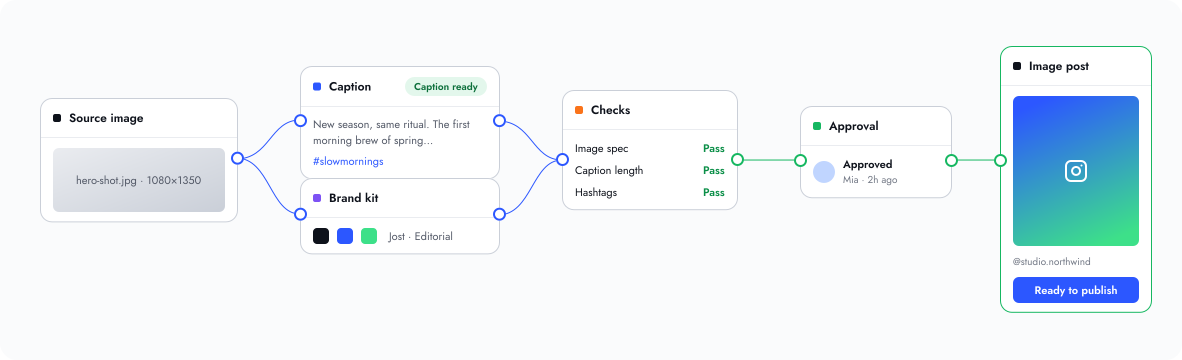
Source image
hero-shot.jpg · 1080×1350
Caption Caption ready
New season, same ritual. The first morning brew of spring…
#slowmornings
Brand kit
Jost · Editorial
Checks
Image specPass
Caption lengthPass
HashtagsPass
Approval
Approved Mia · 2h ago
Image post
@studio.northwind
Ready to publish
Source image
Caption Ready
New season, same ritual…
Checks
Image specPass
CaptionPass
Approval
Approved · Mia
Image post
Ready to publish
Scattered briefsOne connected workspace
Unclear ownershipVisible review steps
Last-minute publishingA deliberate approval path

Your content process, all in one frame.

+
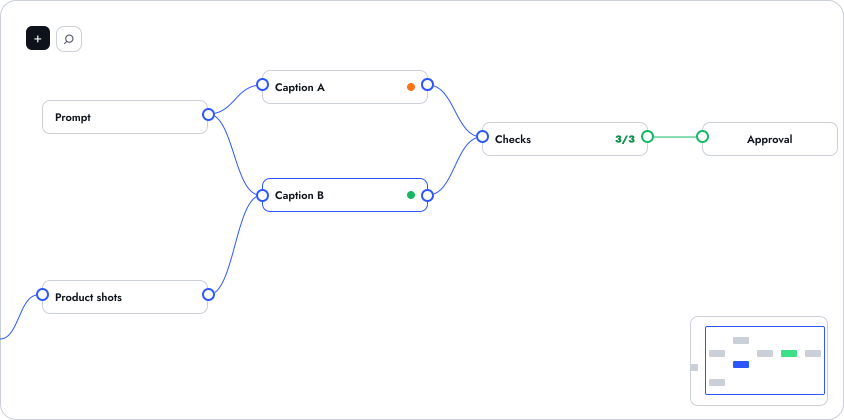
Prompt
Product shots
Caption A
Caption B
Checks 3/3
Approval
  1. 1

    Add content building blocks

    Prompts, images, captions, brand kits, and checks are all nodes.

  2. 2

    Connect inputs and outputs

    Draw a line from one port to another. Dependencies stay visible.

  3. 3

    See what is waiting, ready, or needs attention

    Amber waits, green is ready. No status meetings required.

  4. 4

    Zoom out to understand the full campaign

    The minimap keeps the whole campaign one glance away.

From raw idea to a post worth publishing.

Prompt
01

Shape the idea

Add a prompt, text, image, or source file.

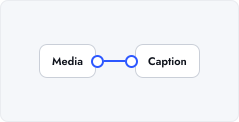
MediaCaption
02

Build the post

Compose media, caption, hashtags, and brand direction.

Image specPass
CaptionPass
ReviewWaiting
03

Check and approve

Validate image specs, caption length, hashtags, and final review.

Publish image post
04

Publish with confidence

Prepare or publish an approved image post to a connected Instagram account.

Live managed publishing currently supports approved single-image posts. Carousels, Reels, and Stories can be prepared and reviewed in the canvas.

Visual workflow canvas

Nodes, ports, connections, groups, search, and minimap.

Instagram post building

Image posts, captions, hashtags, first comments, previews.

Brand kits and layout templates

Crop, resize, typography, and reusable layouts.

On-device AI caption drafts

Draft in the browser, edit before anything is used.

Review, validation, and approvals

Spec checks, approval gates, manual confirmation, history.

Private workspace sync

Signed-in, cloud-synced, resilient in the browser.

A better process for every kind of content team.

Solo creator

Keep ideas, assets, and post-ready copy together.

Marketing team

Give every post a visible review path.

Agency

Reuse client-ready workflows across recurring campaigns.

Designer + strategist

Keep visual production and content direction connected.

Built for real content systems.

  • Visual nodes for assets, copy, checks, and delivery
  • Private signed-in workspaces
  • Instagram-focused publishing workflow

Questions

Is Node Buster an Instagram scheduler?

No. Node Buster is a visual workspace for building a post and the work around it — assets, captions, brand direction, checks, and approvals. Publishing is the last step of that workflow, and it always ends with an explicit confirmation from you.

What can I publish directly today?

Approved single-image posts to a connected Instagram account, after an explicit final confirmation. Carousels, Reels, and Stories are prepared and reviewed in the canvas.

Can I use Node Buster for carousels, Reels, and Stories?

Yes, for preparation and review. You can build and approve them in the canvas today; live managed publishing currently covers approved single-image posts.

Is my workspace private?

Yes. Workspaces are tied to your sign-in, synced to your own private workspace, and resilient in the browser. AI caption drafts are generated on-device, so drafts stay with you until you use them.

Can I start for free?

Yes. Node Buster is in early access and your first workflow is free to build — no payment details needed to start.

Do I need technical workflow experience?

No. There is no new vocabulary to learn. If you can describe how a post gets made, you can build it: drop in nodes and drag from one port to the next.
Make your next post a system, not a scramble.